
Palo alto networks, inc
Access Analyzer: Simplified Queries
Overview
The Strata Cloud Manager Access Analyzer is an AI-driven troubleshooting tool designed to help IT and network administrators diagnose access and connectivity issues within SASE environments. By providing automatic monitoring and an intelligent conversational AI interface, it enables users to quickly analyze why a user, application, or site is experiencing connectivity failures.
The Access Analyzer simplifies troubleshooting through contextual insights and what-if analysis, helping organizations reduce downtime, improve security, and enhance operational efficiency.
The problem
Troubleshooting access issues in a SASE environment is inherently complex. IT and network administrators typically need to collect logs, security policies, authentication records, and network topology details from multiple sources—making the process tedious and error-prone.
Although Access Analyzer was designed to automate access diagnostics, the initial UX introduced friction. A UX audit and quantitative analysis revealed that:
High Page Visits, Low Query Submissions – Many users accessed the tool but abandoned it before submitting a query.
Cumbersome Workflow – Users had to manually fill out multiple fields in a rigid sequence, increasing frustration.
Steep Learning Curve – Administrators unfamiliar with the query-building structure often struggled to generate meaningful insights.
The challenge was clear: how might we streamline query building so that admins can diagnose issues quickly and efficiently?
The new simplified query flow allows users to successfully submit queries without errors in roughly 50% less time.
Target Users
IT Administrators – Manage user access, troubleshoot authentication issues, and ensure seamless connectivity.
Network Administrators – Diagnose network performance and connectivity failures across distributed users, applications,
and locations.
Both user groups needed a faster, more intuitive way to construct and execute troubleshooting queries.
Key UX Challenges
Cumbersome Query Workflow – The previous query builder required manual input in a fixed, linear sequence, making it slow and prone to errors.
Low Engagement & Task Completion – Analytics showed high page views but few query submissions, confirming our hypothesis about the indicating usability issues.
Complexity for New Users – Admins unfamiliar with the query format struggled to construct valid queries.
After joining this team, I performed a UX audit and noted significant usability concerns with the query workflow. The previous implementation was too rigid. I suspected this process was also unintuitive – if an admin didn’t format the query exactly right, they could not submit a query.
Quantitative data backed up these findings. Analytics showed that while many users navigated to the Access Analyzer page (indicating interest), they rarely proceeded to submit a query. Suggesting users were confused by the interface or discouraged by the effort required to get an answer.
Qualitative research further also supported this. During user interviews we asked users to perform this task in production. 1 out of 6 were able to submit a query without guidance. Describing it as “too much work for the result”.
The challenge for the design team was clear: how might we streamline the query-building experience so that users can quickly ask questions and get answers without frustration?
The Solution
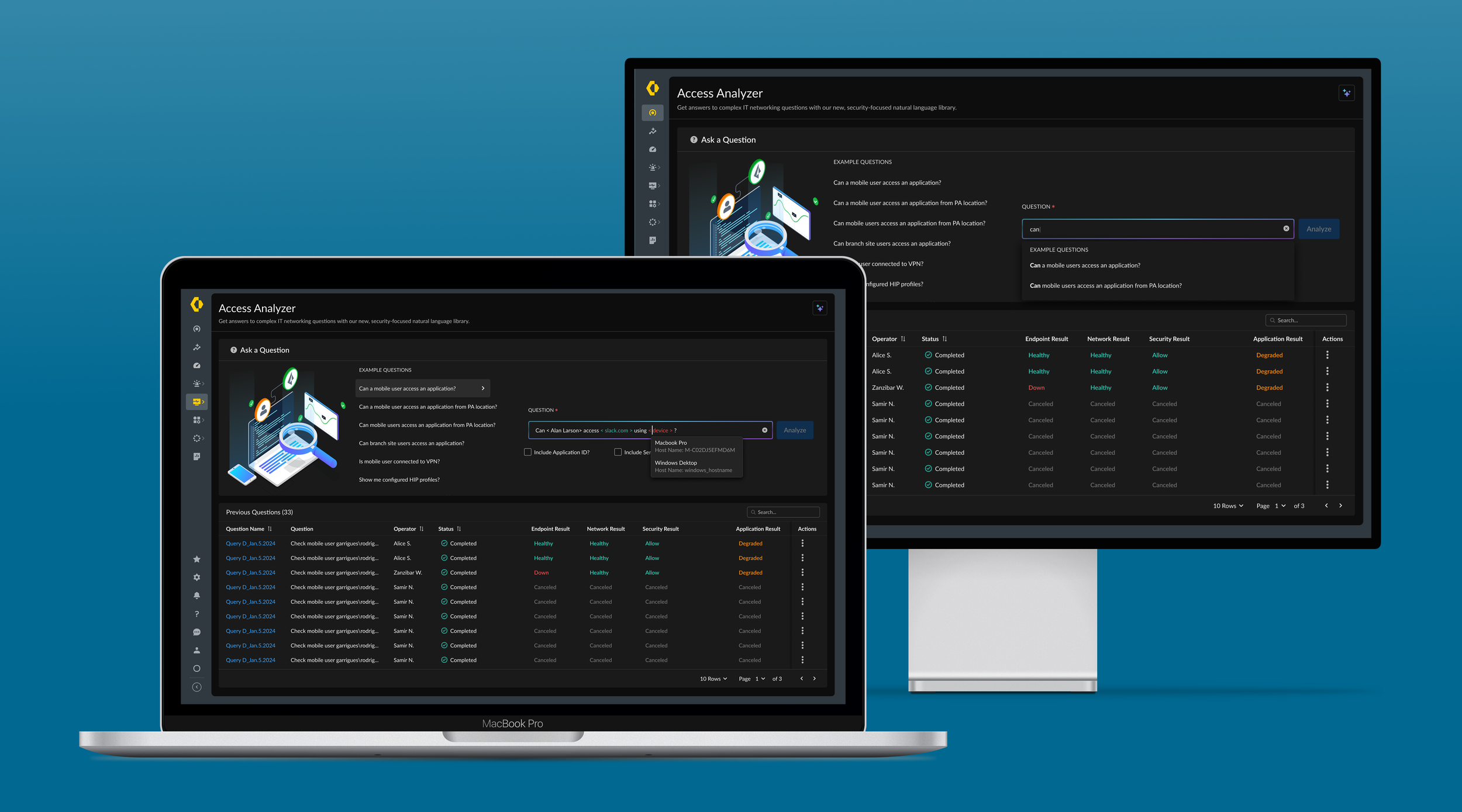
To solve these issues, we embarked on a comprehensive redesign of the query-building experience. The new design focused on simplicity, guidance, and speed.
Users can choose between “Example Questions”, which load a guided pre-built query into the main input field. or they can input a natural language based query and the interface will dynamically suggest the next input expected, essentially walking the user through query creation.
This progressive disclosure approach means users no longer have to parse and then input the query syntax perfectly into a free-text field. There are no longer dead-ends, and users can submit a complex access query in around 10 second.
Access Analyzer queries integrated with our platform-level generative AI Copilot to boost adoption and engagement.
Integration with Generative AI Copilot
An exciting UX enhancement to Access Analyzer came with the integration of Palo Alto Networks’ Generative AI Copilot, an AI-powered assistant embedded across the platform. Copilot enables conversational querying from any page, allowing IT admins to ask plain-language questions like, “Why can’t user Alan Larson access Slack from London?” and receive instant answers or guidance. It interprets queries, consults Access Analyzer, and suggests next steps.
This integration removes the need to navigate to Access Analyzer, bringing troubleshooting directly to users. Copilot spans the entire Strata Security platform (SASE & NGFW) and is accessed via Strata Cloud Manager.
For users, it feels like chatting with a knowledgeable colleague who instantly retrieves network data. It also lowers the barrier for less-experienced admins, allowing them to describe issues instead of manually configuring queries. One security executive noted that natural language interfaces accelerate security response and improve query accuracy.
By embedding AI-driven support, Access Analyzer evolved from a standalone tool into a seamlessly integrated troubleshooting assistant, enhancing usability across the Strata Cloud Manager ecosystem.
Our generative AI Copilot revolutionizes how users engage with our platform. Now they can get information on specific topics from any page on our platform.
My Role
Principal UX Designer responsible for UX Strategy and Design of this feature.
Employed a data-driven design approach, working closely with UX Research
I facilitated “Data Dive-In” meetings where myself, the Product lead, and UX researcher met monthly to review Pendo data, form insights, and hypotheses to guide the design enhancements to this feature.
Worked closely with Product and Engineering teams to incorporate actionable workflows for our users.
Partnered with UX Lead for our AI Copilot product to define Generative AI experience and ensure our integrations were aligned.
Drove awareness for the initiative, adoption, and consistency with teams internally.
Impact & Results
The UX improvements to Access Analyzer led to significant positive outcomes for users and the business. Key results include:
50% Faster Query Submission – Average query-building time reduced from ~20-30 seconds to ~10-15 seconds.
Higher Engagement – More users now complete and submit queries, increasing the tool’s adoption.
Improved Success Rates – Guided input and AI integration reduced errors, allowing users to submit queries on the first attempt.
Seamless AI Assistance – The Copilot integration allows troubleshooting anywhere, eliminating the need to navigate to
multiple pages.
Conclusion
The Strata Cloud Manager Access Analyzer case study exemplifies how thoughtful UX design, backed up by user research, and combined with emerging AI technology, can turn a struggling feature into a star player in the product ecosystem. By addressing the core usability issues (streamlining a clunky workflow into a smooth, natural language query experience) and integrating a generative AI Copilot, the Palo Alto Networks team delivered a solution that truly empowers IT and network administrators.
By redesigning Access Analyzer’s query workflow and integrating generative AI, we transformed the tool into a fast, intuitive, and engaging troubleshooting assistant. The streamlined query builder enables admins to get answers in seconds, while the Copilot integration makes troubleshooting accessible from anywhere in Strata Cloud Manager.
Moving forward, we plan to expand AI-driven automation, enabling proactive anomaly detection and even automated troubleshooting recommendations, continuing to enhance the user experience.