
Palo alto networks, inc
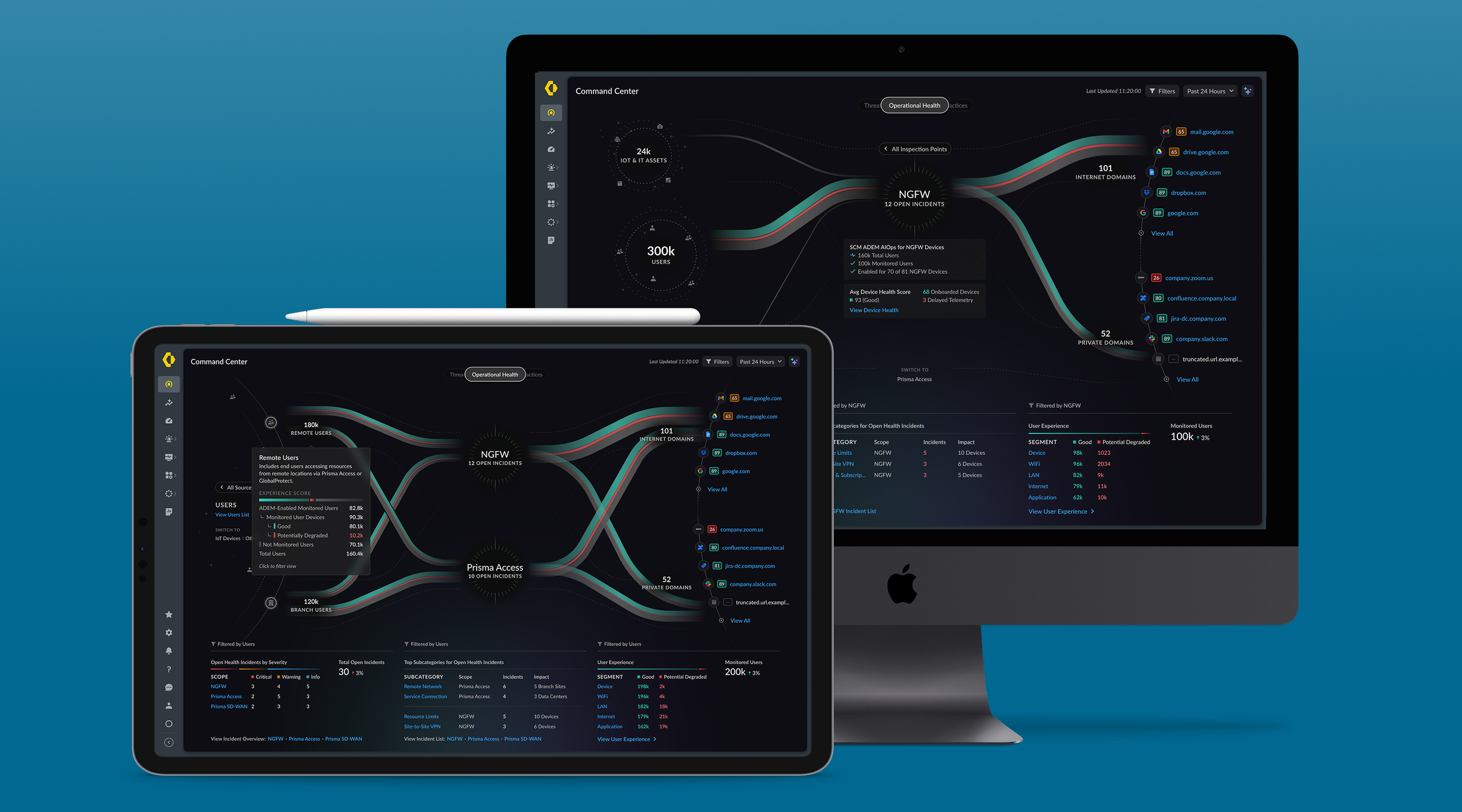
Strata Cloud Manager: Command Center
Overview
The Strata Cloud Manager Command Center, developed by Palo Alto Networks, is an innovative security management tool that offers comprehensive visibility of an entire network security deployment in one place. It was designed to address fragmented visibility challenges and deliver an intuitive, centralized experience for managing network security. By presenting a top-level visual summary of network health and threats, it enables administrators to assess security posture at a glance and take action quickly.
Project Goals
True Summary Experience – Create a one-stop summary view for network security, moving away from disjointed or overly customizable dashboards.
Centralized Visibility – Provide unified insight into the entire security deployment from a single interface, eliminating the need to jump between multiple tools.
Improved Efficiency – Streamline workflows so security and network administrators can respond to issues faster, without navigating numerous separate dashboards.
Target Users
Network Administrators – Oversee network operations and need quick status checks and alerts in one place.
Security Administrators – Monitor threats and policy enforcement across the network, benefiting from a consolidated threat and health overview.
Chief Information Security Officers (CISOs) – Gain high-level visibility into the organization’s security posture and operational health for informed decision-making.
The problem
Before Command Center, users had no way to get a holistic view of their security environment at a glance. Teams were forced to search through multiple disparate dashboards and tools, making it difficult to quickly assess the overall security posture. This fragmented approach meant critical issues could be missed or slow to spot. The key UX challenge was to design a unified interface that brings together all crucial network security information. It needed to be highly usable and provide actionable insights so that administrators could not only view status information but also quickly drill down or respond to threats as needed.
The Solution
An interactive visual summary that will help you assess the health, security, and efficiency of your network. The Command Center provides a consolidated view of the NetSec platform, and gives you comprehensive visibility into your Users / Sources, Applications, Prisma Access deployment, your NGFWs, and your security services in a single place.
My Role
Managed the team responsible for the design of this feature.
Motivated the team by creating the design vision and drove initiative from concept to code.
I facilitated UX research to develop data and insights, test assumptions, and guide the design of this features to achieve business goals and meet our user’s needs.
Worked closely with Product and Engineering teams to define actionable workflows for our users.
Helped drive awareness for the initiative, adoption, and consistency with other teams.
The Process
User Research & Discovery – The team conducted extensive research (user interviews, quantitative analysis) to understand user pain points and needs. We discovered that users were overwhelmed by jumping between dashboards and craved a “true summary” view instead of juggling separate, customizable dashboards for each service. These insights solidified the vision for a unified summary experience.
Concept & Collaboration – In the concept phase, Palo Alto Networks partnered with Observable, a leader in dashboard design, to push the boundaries of modern interface visualization. Through cross-collaboration, they leveraged Observable’s expertise in interactive data visualizations to craft an intuitive, data-rich dashboard. Early concepts focused on how to present complex security data in a clear, digestible format, ensuring that even a high-level overview would be actionable and informative.
Iteration & Implementation – Following the conceptual design, I created a dedicated “tiger team” of product designers and engineers to iterate on the Command Center and review weekly. We built prototypes and iterated based on user feedback in cycles, refining the layout, widgets, and workflows. This iterative approach maintained momentum and ensured the design truly met user needs. Once validated, the team worked on a seamless transition from design to development, ensuring that what was envisioned (the unified summary and interactive elements) was faithfully implemented in the final product.
Innovative Features
Unified Overview – The Command Center delivers a single-page overview that consolidates all essential network security metrics and insights. Instead of checking separate systems for firewall status, threats, user activity, or device health, administrators get everything on one screen. This unified overview acts as the new “home page” for our network security platform – a quick snapshot of organizational security posture and network health.
Actionable Insights – Beyond just displaying data, the interface provides inline recommendations and actions. For example, if a threat spike is detected or a device is unhealthy, the Command Center surfaces recommendations and allows admins to take action (such as isolating a device or investigating an alert) directly from the dashboard. This tight integration means users can respond to security events without switching context, greatly reducing response time.
Optimized Data Visualization – The design leverages best-in-class visualization techniques (inspired by the partnership with Observable) to present complex data in digestible formats. Interactive charts, flow diagrams, and trend lines are used to highlight important patterns. The visual design emphasizes clarity: for instance, network traffic flows and threat sources are illustrated so that even at a glance, critical information jumps out. This modern, clean visualization helps users quickly interpret data and gain insights that might be missed in text-heavy or poorly organized dashboards.
Impact
Holistic Issue Identification – During development, the team discovered and resolved a major UX issue from earlier dashboard designs (related to how data was fragmented across views). By fixing this, they significantly improved overall usability and ensured critical information is never overlooked on the summary page.
Primary Entry Point for Workflows – The Command Center rapidly became the most viewed page on the platform. It now serves as the primary launch point for the majority of user workflows. Administrators log in and start at Command Center to decide where to drill down next, which underscores its value in daily operations.
Enhanced Decision-Making – With a clear, centralized overview, security professionals can make decisions faster and with greater confidence. The Command Center’s at-a-glance insights reduce the noise and highlight what matters, enabling teams to prioritize responses to threats or network issues. Overall, it has elevated the efficiency of security operations by providing the right information in one accessible place.
The command Center also works as an upsell tool, demonstrating the value of ADEM. With ADEM (left), without ADEM (right).
The Results
What started as a UX-driven initiative, was later picked up by Product and is now a key sales tool used to demonstrate the value of the platform with new customers.
The Strata Cloud Manager Command Center has revolutionized how security teams monitor and manage network security. By centralizing key insights and presenting them in an intuitive summary format, it solved a critical user need for holistic visibility. The design, driven by user research and innovative collaboration, introduced actionable capabilities that streamline how administrators respond to threats and maintain network health.
In summary, the Command Center significantly enhanced efficiency for network and security admins, validating the importance of user-driven design in building impactful security management solutions. It stands as a testament to how a well-designed UX can transform a complex multi-dashboard ordeal into a single, powerful command post for security operations.